Deploying the Email Server
Note: Ensure that all prerequisites are completed before proceeding with the deployment.
Install Required Software
System Packages
sudo apt install -y git openssl curl gawk coreutils grep jq fail2ban ufw
Install Docker and Supporting Packages
sudo curl -sSL https://get.docker.com/ | CHANNEL=stable sh
sudo systemctl enable --now docker

sudo apt install docker-compose-plugin docker-compose
Install Mailcow
Clone the Mailcow Repository into a Local Folder
sudo -i
umask 0022
cd /opt
git clone https://github.com/mailcow/mailcow-dockerized
Generate the Mailcow Configuration
cd /opt/mailcow-dockerized
./generate_config.sh
Update the Configuration File 'mailcow.conf' if Needed
No changes are required if all prerequisites are set up and followed.
Bring Up the Mailcow Instance
Pull All the Latest Images
cd /opt/mailcow-dockerized
docker compose pull
Bring Up the Instance
cd /opt/mailcow-dockerized
docker compose up -d
Output:
[+] up 18/18
 ✔ Container mailcowdockerized-olefy-mailcow-1          Running    0.0s
 ✔ Container mailcowdockerized-memcached-mailcow-1      Running    0.0s
 ✔ Container mailcowdockerized-unbound-mailcow-1        Running    0.0s
 ✔ Container mailcowdockerized-dockerapi-mailcow-1      Running    0.0s
 ✔ Container mailcowdockerized-sogo-mailcow-1           Running    0.0s
 ✔ Container mailcowdockerized-clamd-mailcow-1          Running    0.0s
 ✔ Container mailcowdockerized-postfix-tlspol-mailcow-1 Running    0.0s
 ✔ Container mailcowdockerized-netfilter-mailcow-1      Running    0.0s
 ✔ Container mailcowdockerized-redis-mailcow-1          Running    0.0s
 ✔ Container mailcowdockerized-mysql-mailcow-1          Running    0.0s
 ✔ Container mailcowdockerized-php-fpm-mailcow-1        Running    0.0s
 ✔ Container mailcowdockerized-dovecot-mailcow-1        Running    0.0s
 ✔ Container mailcowdockerized-ofelia-mailcow-1         Running    0.0s
 ✔ Container mailcowdockerized-rspamd-mailcow-1         Running    0.0s
 ✔ Container mailcowdockerized-nginx-mailcow-1          Running    0.0s
 ✔ Container mailcowdockerized-acme-mailcow-1           Running    0.0s
 ✔ Container mailcowdockerized-postfix-mailcow-1        Running    0.0s
 ✔ Container mailcowdockerized-watchdog-mailcow-1       Running    0.0s
Accessing Your Instance
You can now access https://${MAILCOW_HOSTNAME}/admin using the default credentials: username 'admin' and password 'moohoo'.
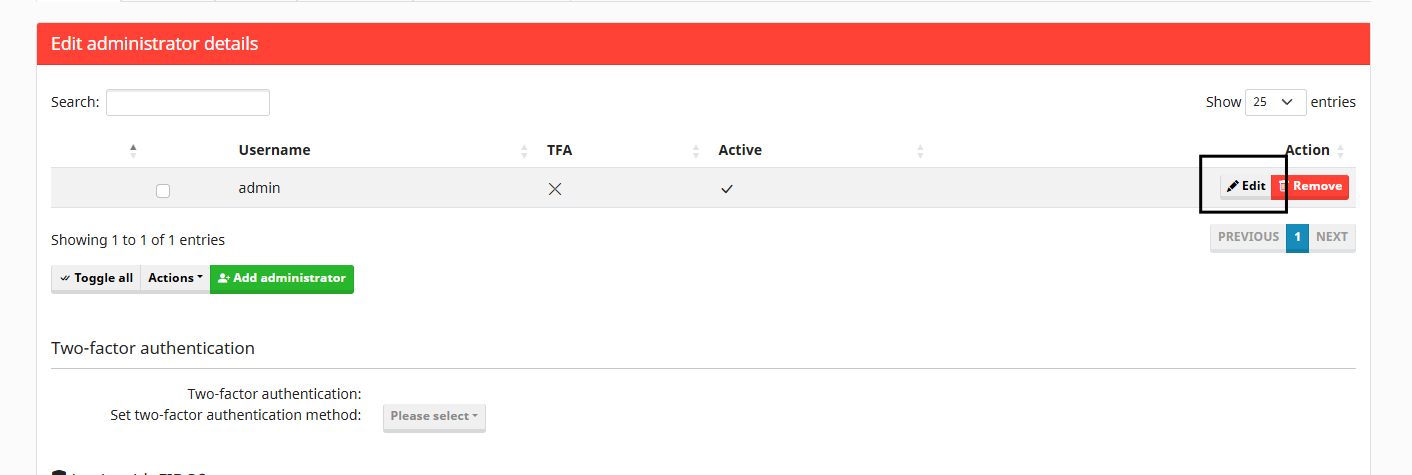
Change Your Admin Password
Navigate to https://${MAILCOW_HOSTNAME}/system and use the "Edit" button next to the "admin" user to update the password and enable stronger security for the administrator.